What is a hold?#
A hold is a temporary reservation of funds. It's a way to ensure that funds are available when you need them. When you place a hold on a wallet, the funds are not available for spending, but they are still part of the wallet's balance.
After being placed, a hold can be confirmed, or it can be canceled. When a hold is confirmed, the funds are no longer available for spending and are transferred to the recipient's wallet. When a hold is canceled, the funds are released back to the wallet's balance.
Placing a hold#
While reading their brand new spellbook acquired earlier, Eryldor found the spell they were looking for. However, they need to buy an extra component to cast it. As it is a rare component, the only way they can get it is by participating in an auction.
Fortunately, at the auction-house, Eryldor found the component they need. They placed a bid of 2 COIN, and the auctioneer placed a hold on Eryldor's wallet to ensure that the funds are available when the auction ends, if Eryldor wins.
You'll act as the auctioneer and place a hold on Eryldor's wallet.
With fctl, you place a hold using the wallets debit command, as if you were debiting the wallet. To create a hold rather than a debit, you use the --pending flag.
You should see the following output:
Inspecting the hold#
Let's inspect Eryldor's wallet in the Formance Console.
Open the Formance Console and navigate to the Wallets page. You should see a new hold on Eryldor's wallet.
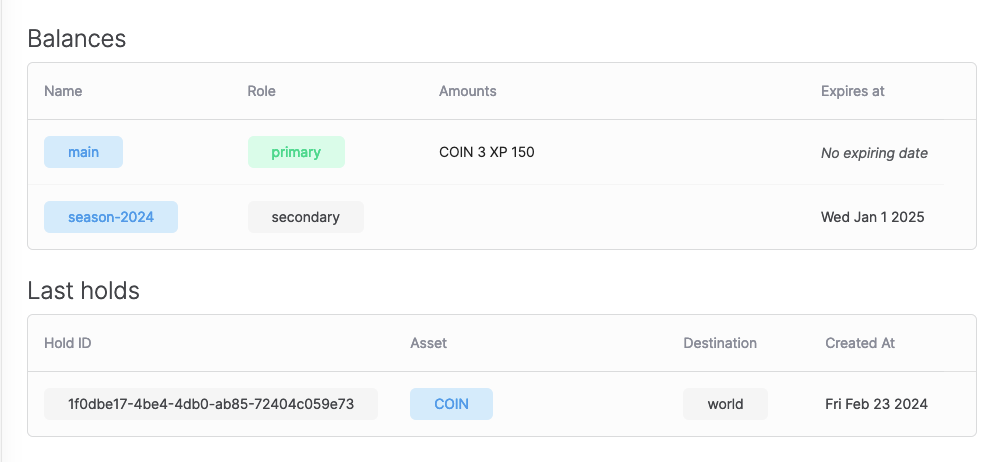
Originally, assuming you've followed the previous tutorials, Eryldor's wallet had a balance of 5 COIN. After placing the hold, the wallet's balance became 3 COIN, and the hold was created with an amount of 2 COIN.
Now, should Erlydor win the auction? You choose!
Confirming the hold#
After the auction ends, Eryldor won the bid. The auctioneer will take the money from the hold placed earlier on Erlydores wallet.
To confirm the hold, you use the fctl wallet hold confirm command.
Canceling the hold#
If Eryldor didn't win the auction, the hold can be canceled to release the funds back to the wallet's balance.
To cancel the hold, you use the fctl wallet hold void command.
Partially confirming the hold#
In some cases, you may want to confirm only a portion of the hold.
For example, Eryldor is ready to pay up to 4 coins for the auction. The auctioneer placed a hold of 4 coins on Eryldor's wallet. However, Eryldor won the auction with a bid of 3 coins. The auctioneer can confirm only 3 coins and cancel the remaining 1 coin.
First, you'll put a hold of 4 coins on Eryldor's wallet.
You should see the following output:
If your wallet doesn't have enough funds, you can top it up using:
Now, you'll confirm only 3 coins of the hold.
You should see the following output:
Summary#
In this section, you learned how to manage holds with Formance Wallets. You placed a hold on a wallet, confirmed the hold, canceled the hold, and partially confirmed the hold. You also learned how to inspect a wallet's holds in the Formance Console.